Unihertz Titan vs Clicks vs BBKeyboard: Which Physical Keyboard Setup Fits You?

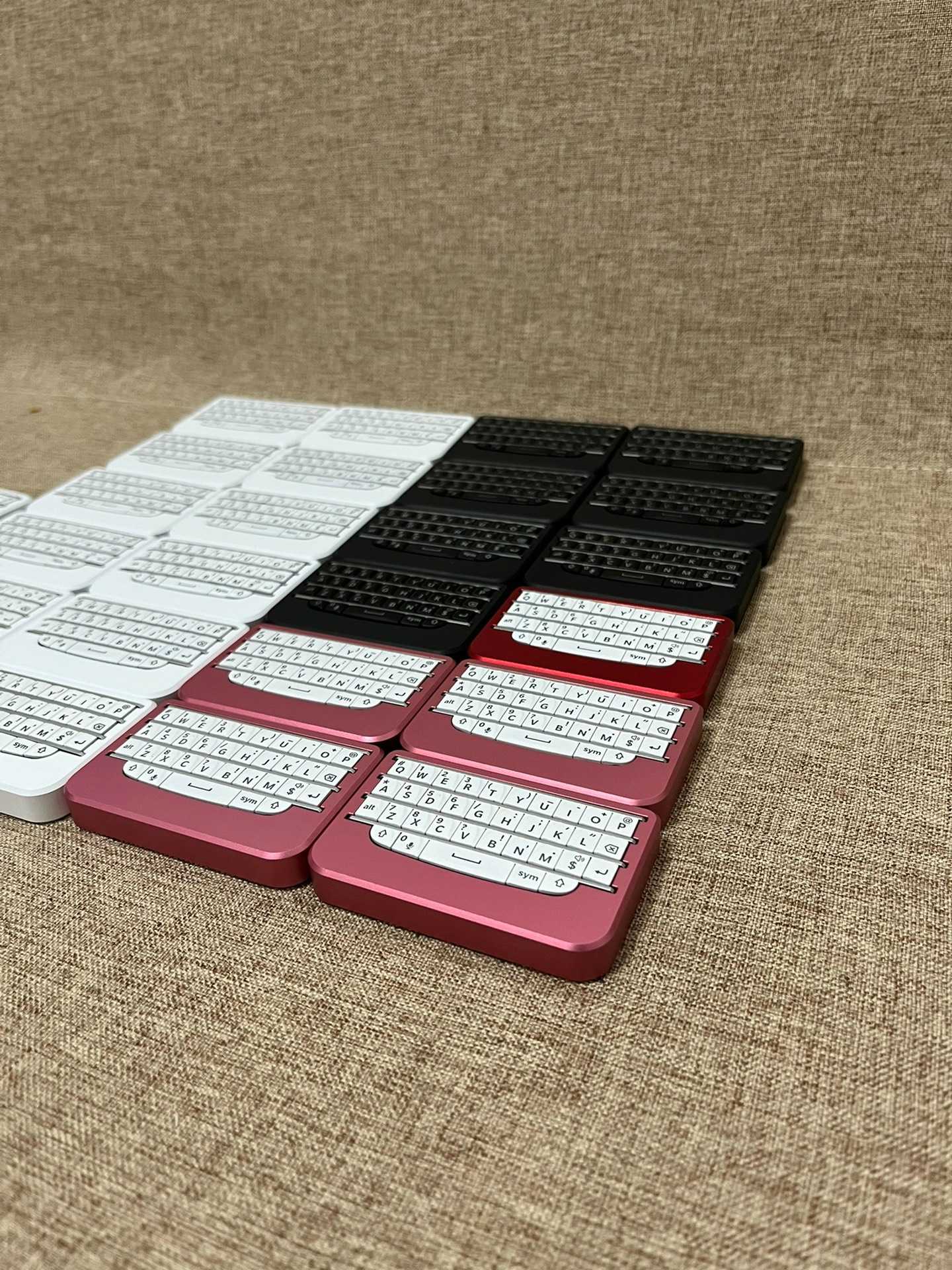
EcomShot generated BBQ20KBD mini keyboard cover

Short answer

Choose Unihertz Titan if you want the physical keyboard built into the phone and you are comfortable choosing that whole phone. Choose Clicks if you want a keyboard attached to a compatible phone case. Choose BBKeyboard if you want BlackBerry-style physical keys without locking the keyboard to one phone body.

For the broader category decision, read the physical keyboard for phone guide, which separates keyboard phones, attached cases, and standalone mini Bluetooth keyboards before you choose a product.

This is a decision guide, not a hands-on lab review of every product. The practical question is not which option is universally best. It is whether you want a keyboard phone, an attached case, or a separate keyboard accessory that can move between devices.

Option Best fit Main advantage Main trade-off Start here
Unihertz Titan Buyers who want one phone with built-in keys The keyboard is always part of the device You are choosing the phone, software, size, camera, and update path together Compare current phone reviews and support expectations
Clicks keyboard case Buyers who want keys attached to a compatible phone Case-style typing with no separate keyboard to carry Fit is tied to a specific phone model or family Confirm exact Clicks model compatibility
BBKeyboard Buyers who want a reusable mini keyboard The keyboard can outlive a phone upgrade and work across more than one screen It is a separate accessory to pair, charge, and carry Compare BBKeyboard models

Why this comparison matters

People comparing Unihertz Titan and Clicks are usually solving a bigger problem: they want physical keys back on modern mobile devices. The SERP pressure around this topic is heavy with Reddit discussions, YouTube demos, and review-style pages, so a useful article should avoid pretending there is one universal winner. The real difference is product category.

Unihertz Titan is a phone decision. Clicks is a case decision. BBKeyboard is an input-device decision. That distinction makes the buying path clearer before you start comparing price, typing feel, or accessories.

Unihertz Titan: choose the keyboard phone path

Unihertz Titan fits buyers who want the physical keyboard attached all the time. If you miss the all-in-one phone format, this is the cleanest category. You do not pair a second keyboard, you do not attach a case, and you do not decide when to bring the keyboard. It is simply part of the phone.

The trade-off is commitment. A keyboard phone means accepting the phone as a complete device: size, weight, app behavior, camera expectations, Android version, accessories, and long-term support. That can be exactly right for a user who wants one rugged-feeling physical-keyboard phone, but it is too much commitment if you already like your current iPhone, Android phone, tablet, or laptop workflow.

Clicks: choose the attached case path

Clicks is better understood as a keyboard case, not as a general-purpose keyboard. It is the right category when you want physical keys attached to a compatible phone and you do not want a separate keyboard in your bag. If your typing happens mostly on one supported phone, the attached format can feel natural.

The main caution is device fit. A case keyboard is shaped for specific phone families, and that fit can become outdated when you upgrade your phone. Before buying any case-style keyboard, check the exact model page, charging behavior, camera clearance, and whether the added phone length fits your daily carry.

BBKeyboard: choose the separate keyboard path

BBKeyboard is the flexible route. It is not a smartphone, and the standalone mini keyboard models are not phone cases. They are compact BlackBerry-style keyboard accessories for users who want tactile keys while keeping their current device choices open.

That separation is the main reason to choose BBKeyboard. You can pair or connect the keyboard for writing, messages, shortcuts, search, terminal work, tablet use, desk setups, or media-control workflows, then leave it behind when you do not need physical keys. If your phone upgrade cycle is shorter than your keyboard ownership cycle, a separate keyboard can make more sense than a phone-specific case.

BBKeyboard model Best role in this comparison Product page
BBQ10KBD Compact Q10-style thumb typing View BBQ10KBD
BBQ20KBD Best all-round standalone choice with Bluetooth, USB-C, backlight, and navigation control View BBQ20KBD
BBP9981KBD Lite Premium P9981-style keyboard-only model View BBP9981KBD Lite
BBP9981KBD Pro Premium keyboard plus pointer-control model View BBP9981KBD Pro

Who should choose what?

Choose Unihertz Titan if…

  • You want one phone with keys attached all day.
  • You are ready to choose a whole phone around the keyboard.
  • You do not need the same keyboard to work with a tablet, laptop, or desktop.

Choose Clicks if…

  • You use a supported phone model and want a fitted keyboard case.
  • You prefer one attached object over a separate accessory.
  • You are comfortable checking phone-specific compatibility before every upgrade.

Choose BBKeyboard if…

  • You like your current phone and only want physical keys.
  • You type across several devices during the day.
  • You want a keyboard that can remain useful after your next phone change.
  • You want to compare several BlackBerry-style layouts before buying.

Buying checklist

  • Device lock-in: Titan is the highest lock-in, Clicks is phone-model lock-in, and BBKeyboard is the most device-independent.
  • Carry style: Titan and Clicks keep keys attached; BBKeyboard lets you carry keys only when needed.
  • Upgrade logic: phone and case products can become model-specific; a separate keyboard can follow new phones.
  • Typing location: phone-only typing favors Titan or Clicks; multi-screen typing favors BBKeyboard.
  • Support path: use current product pages, compatibility guides, and return/support notes before ordering.

Recommended BBKeyboard path

If this comparison points you toward a separate keyboard, start with the BBKeyboard buyer guide, then read the Q10 vs Q20 vs P9981 layout guide. If compatibility is the main concern, use the setup and compatibility guide. If you are still evaluating the attached-case route, read Is the Clicks Keyboard Case Worth the Investment? as a related review-style internal page.

For most first-time buyers, BBQ20KBD is the safest all-round BBKeyboard model because it balances a fuller Q20-style layout with Bluetooth, USB-C mode, backlight, navigation control, and multi-device pairing. Choose BBQ10KBD if compact carry matters most, or BBP9981KBD Pro if pointer control is part of the workflow.

FAQ

Is BBKeyboard a Clicks alternative?

Yes, but only if you want a separate keyboard instead of an attached case. Clicks is strongest when the keyboard should stay physically attached to one compatible phone. BBKeyboard is strongest when the keyboard should work across more than one device.

Is BBKeyboard a Unihertz Titan alternative?

It can replace the physical-keyboard part of the desire, but it does not replace the phone. Choose BBKeyboard when you already like your phone and want to add tactile keys without switching phone ecosystems.

Which BBKeyboard model should most people compare first?

Start with BBQ20KBD. It is the most balanced standalone option. Then compare BBQ10KBD for compact carry and BBP9981KBD Pro for premium keyboard plus pointer control.

Should I buy a keyboard phone, a keyboard case, or a separate keyboard?

Buy a keyboard phone if you want one device. Buy a keyboard case if you want keys attached to one supported phone. Buy a separate keyboard if you want flexibility across phones, tablets, laptops, and desk setups.

Bottom line

Unihertz Titan wins when you want the phone and keyboard fused together. Clicks wins when you want a case keyboard for a supported phone. BBKeyboard wins when the keyboard should be independent, reusable, and useful across more than one device.